SBOM (Software Bill of Materials)
A Software Bill of Materials (SBOM) is a comprehensive inventory of all software components, libraries, and dependencies used in an application. bifrost uses SBOMs to analyze your services for known vulnerabilities and security risks.
What SBOM upload enables in bifrost
Section titled “What SBOM upload enables in bifrost”Uploading an SBOM to bifrost enables:
- CVE Lookup: Automatically identify known vulnerabilities (CVEs) in your service dependencies and components
- CVE History Tracking: Track the evolution of vulnerabilities across different versions of your services over time
- CVE Analysis: Gain insights into which vulnerabilities are relevant to your specific service context, reducing noise from irrelevant CVEs
bifrost supports uploading multiple SBOMs per service version, allowing you to track vulnerabilities across different aspects of your application (e.g., separate SBOMs for different container images or dependency sets). Enabling a complete overview of your service’s security posture.
Supported SBOM formats
Section titled “Supported SBOM formats”bifrost supports the following SBOM formats:
- CycloneDX (JSON format)
- SPDX (JSON format)
Generating SBOMs
Section titled “Generating SBOMs”SBOMs can be generated using various tools depending on your stack:
Using GitHub’s built-in SBOM service
Section titled “Using GitHub’s built-in SBOM service”GitHub can automatically generate SBOMs for your repositories through the dependency graph feature. This is available for both public and private repositories and supports multiple ecosystems.
To export an SBOM from GitHub:
- Navigate to your repository on GitHub
- Go to the “Insights” tab
- Click on “Dependency graph” in the sidebar
- Click “Export SBOM” to download in SPDX format
For more details, see GitHub’s guide on exporting SBOMs.
For container images
Section titled “For container images”# Using Trivytrivy image --format cyclonedx <image> > sbom.jsonFor application dependencies
Section titled “For application dependencies”For applications, it’s recommended to generate SBOMs as part of your build process. Most modern programming languages and build tools have plugins or libraries available to generate SBOMs in CycloneDX or SPDX format. This ensures your SBOM accurately reflects your application’s dependencies at build time, which is important for accurate vulnerability tracking and compliance.
SBOM generation tools
Section titled “SBOM generation tools”- CycloneDX GoMod Generate SBOM - GitHub action to generate a CycloneDX SBOM for Go modules (uses
cyclonedx-gomod) - CycloneDX .NET Generate SBOM - GitHub action to generate a CycloneDX SBOM for .NET (uses
dotnet tool CycloneDX) - CycloneDX Node.js Generate SBOM - Generate a CycloneDX SBOM for Node.js (deprecated, use
npx @cyclonedx/cyclonedx-npminstead) - CycloneDX Python Generate SBOM - Generate a CycloneDX SBOM for Python
- CycloneDX Gradle Plugin - Gradle plugin to generate CycloneDX SBOMs for Java projects
- Syft – A CLI tool and Go library for generating SBOMs from container images and filesystems
- Microsoft SBOM Tool - Command-line tool to generate SBOMs in SPDX for a variety of languages and package managers
Uploading SBOMs
Section titled “Uploading SBOMs”SBOMs are uploaded to bifrost using the bifrost CLI or the integration API. This associates the SBOM with a specific service version for vulnerability analysis. The SBOM can be uploaded during the build step before deployment (e.g., in a CI/CD pipeline) or after the service has already been deployed.
Multiple SBOMs can be uploaded for the same service version, allowing you to track vulnerabilities across different components or images within a single version.
GitHub Actions
Section titled “GitHub Actions”If you generate SBOMs in GitHub Actions, use bifrostsec/submit-sbom-action. It bundles the bifrost CLI, uploads the SBOMs for your service version, and includes Git metadata from the workflow run.
Store your bifrost API token as a GitHub secret, for example BIFROST_API_TOKEN.
name: buildon:  pull_request:
jobs:  build:    name: Build and submit SBOM    runs-on: ubuntu-latest    steps:      - name: Checkout code        uses: actions/checkout@v6
      - name: Build code        run: make build
      - name: Generate SBOM        uses: anchore/sbom-action@v0.21.1        with:          path: .          format: spdx-json          output-file: build/sbom.spdx.json
      - name: Send SBOM to bifrost        uses: bifrostsec/submit-sbom-action@v1        with:          api-token: ${{ secrets.BIFROST_API_TOKEN }}          service: my-service          service-version: v1.0.0          sbom-path: build/sbom.spdx.json
To upload both an application SBOM and an image SBOM, provide sbom-path as a multiline value:
- name: Send SBOMs to bifrost uses: bifrostsec/submit-sbom-action@v1 with: api-token: ${{ secrets.BIFROST_API_TOKEN }} service: my-service service-version: v1.0.0 sbom-path: | build/sbom-application.cdx.json build/sbom-image.cdx.jsonYou can also submit the repository SBOM exported from GitHub’s dependency graph:
- name: Send GitHub dependency graph SBOM to bifrost uses: bifrostsec/submit-sbom-action@v1 with: api-token: ${{ secrets.BIFROST_API_TOKEN }} service: my-service service-version: v1.0.0 dependency-graph: trueYou can combine sbom-path and dependency-graph: true to submit local SBOM files and the GitHub dependency graph SBOM in the same action invocation.
bifrost CLI
Section titled “bifrost CLI”For CLI installation and general usage, see the bifrost CLI reference.
Upload a generated SBOM
Section titled “Upload a generated SBOM”export BIFROST_API_KEY="<your-api-token>"
bifrost --service=my-service --service-version=1.2.3 sbom upload ./sbom.jsonUpload multiple SBOMs
Section titled “Upload multiple SBOMs”It is good practice to upload separate SBOMs for the application code and the container image. This gives bifrost a clearer view of both your direct dependencies and the runtime image contents:
bifrost --service=my-service --service-version=1.2.3 sbom upload \ ./sbom-application.cdx.json \ ./sbom-image.cdx.jsonPipe an SBOM from Trivy
Section titled “Pipe an SBOM from Trivy”trivy image --format cyclonedx myapp:1.2.3 \ | bifrost --service=my-service --service-version=1.2.3 sbom upload -Pipe from GitHub dependency graph
Section titled “Pipe from GitHub dependency graph”gh api \ -H "Accept: application/vnd.github+json" \ -H "X-GitHub-Api-Version: 2026-03-10" \ /repos/OWNER/REPO/dependency-graph/sbom \ --jq '.sbom' \ | bifrost --service=my-service --service-version=1.2.3 sbom upload -Include Git metadata
Section titled “Include Git metadata”bifrost \ --service=my-service \ --service-version=1.2.3 \ --git-branch="$GITHUB_REF_NAME" \ --git-commit-sha="$GITHUB_SHA" \ --git-origin="$GITHUB_SERVER_URL/$GITHUB_REPOSITORY" \ sbom upload ./sbom.jsonIntegration API
Section titled “Integration API”You can also upload an SBOM directly to the integration API:
curl -X POST \ "https://portal.bifrostsec.com/api/v2/service/my-service/version/sbom?version=1.2.3&image=registry.example.org/my-service:1.2.3" \ -H "Authorization: Bearer $INTEGRATION_TOKEN" \ -H "Content-Type: application/json" \ --data-binary @sbom.jsonThe version and image query parameters are both optional, but at least one is required. We recommend providing both for more accurate version tracking and derivation. If only image is provided, bifrost derives the service version from the image tag or digest.
For full API details, see the OpenAPI specification.
Vulnerability analysis
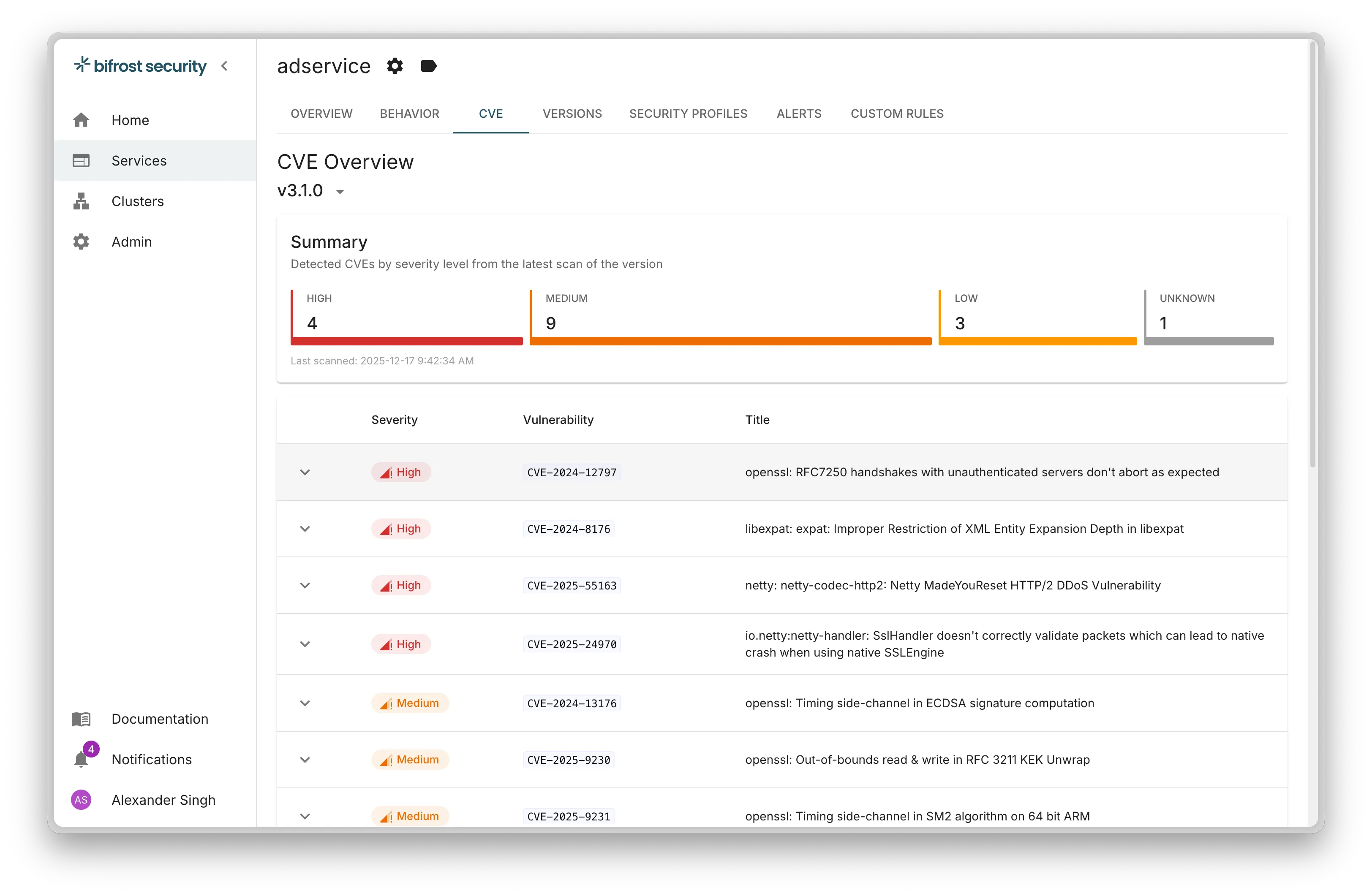
Section titled “Vulnerability analysis”After uploading an SBOM, bifrost automatically:
- Analyzes all components and dependencies in the SBOM
- Matches them against known vulnerability databases
- Identifies relevant CVEs for your specific service context
- Provides actionable recommendations for remediation
- Analyzes your security profiles to filter out irrelevant CVEs (requires your organization AI-settings to be enabled)
You can view vulnerability results in the bifrost portal under your service version details.
Best practices
Section titled “Best practices”- Generate SBOMs for every build: Include SBOM generation in your CI/CD pipeline
- Include component metadata: When uploading SBOMs for container images, make sure the SBOM contains the image reference or component name for better tracking
- Keep SBOMs up to date: Upload a new SBOM whenever dependencies change
- Include all layers: For container images, ensure your SBOM tool scans all layers, not just the application code